Email
your answers to ALL questions in ONE file called yournameweek02.doc
(apcom@live.co.uk)
Foundation Degree – Introduction to Computer
Networks
Week 2
802.5
802.5 is the major alternative to 802.3. It is currently supported by IBM systems and referred to as SNA (Systems Network Architecture).
802.5 is also known as Token Ring because the cable that joins all the computers on the network is a closed ring with devices connected anywhere around the ring. There is only one packet which circulates constantly around the ring by hopping from one device to the next. If a device needs to send data it grabs the packet (token) next time round and puts the data into the token along with the address of the receiving device and it’s own sender address. The packet (token) then travels around the ring to the receiver which grabs the packet and unloads the data. This data is replaced with a ‘Thank you’ message and travels back to the sender. The sender knows that the data arrived safely so empties the token and sends it on until another device needs it. Lovely! No collisions, but there must be a catch!
Frames
Both 802.3 and 802.5 protocols need to make FRAMES in order to package the raw data by surrounding it with information that the network devices will need to ensure safe delivery to the correct destination. The FIELDS that make up the frames contain addresses.



Token
Addressing
Each device such as a PC or printer that is attached to a LAN has a UNIQUE address. This is a pattern of 48 BITS which makes 6 octets. The pattern is placed into the Network Interface Card (NIC) on the production line and no two cards have the same address. It is known as the MAC (Media Access Control) address. To make the address easier to read it is usually written as a hexadecimal number. For example
011001001110001101000111001011001100101111001010 is 64 E3 47 2B DB DA in Hex
Q. Click start then Run, enter cmd to
enter the command prompt then type ipconfig /all. This will show you your MAC
address (shown as physical address)
Topologies
So far we have 802.5 computers connected together with a wire which joins them all in the shape of a ring – a RING TOPOLOGY. 802.5 is called Token Ring. 802.3 (Ethernet) computers have so far been connected by a single wire called a bus – a BUS TOPOLOGY.
One of the problems with these two topologies is that they stop working if there is a loose connection anywhere in the network or if anyone cuts the bus cable. A better idea would be to bring a separate cable from each device to a central device like a HUB. This is called a STAR TOPOLOGY.
Q. Find diagrams or a variety of NETWORK
TOPOLOGIES.
Network cable design has been standardised with Category 5 cables consisting of thin wires twisted together then bundled and wrapped in insulation. The insulation may contain a braided metal shield for working in harsh and electrically noisy environments.
Cat 5 UTP – Unshielded Pair
Cat 5 STP – Shielded Pair
Q. Find details of Cat 6. What information is printed on the cable?
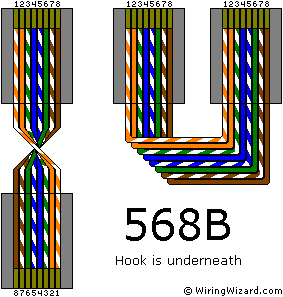
The twisted pairs are colour coded as below.
|
Figure 4: RJ-45,
568-B Standard |
|
|
|
Figure 3: RJ-45, 568-A Standard |
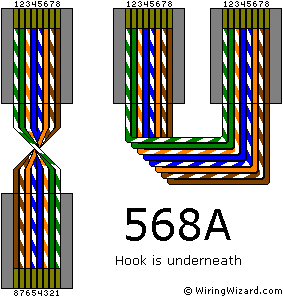
Either of these will
work but stick to one or the other. Don’t wire a cable with 568A at one end and
568B at the other!! I usually use 568B but don’t know why!
Network Interface
Card
The network interface card does a number of things and uses pure electronics as much as possible for high speed. There is a small microprocessor on the card which runs a program (slow!) but this is necessary because it has to interface with the motherboard and the programs running on the main processor. You might gather by this that there are two distinct parts the interface card and they are seen as two layers, or more correctly, two sublayers.
Main features of a
Network Interface Card
1 A connector to attach to the physical part of the network. Maybe more than one type of connector eg RJ45 and Optical Fibre
2 The card contains a unique address which is burnt in on the production line. This is the physical address or MAC (Media Access Control) address and is 48 bits long (6 Bytes). This means that there are 2x2x2x2x2x2x2x2x……….x2 48 times or 256 X 256 X 256 X 256 X 256 X 256 addresses available before we run out.
3 The network card sends regular messages to all the other cards to find out who they are and if they are still alive (switched on)
4 The on-board electronics can calculate the CRC/FCB to check that the packet is not corrupted (no program involved – fast)
5 The card can assemble and disassemble packets eg 802.3, 802.5 etc
Network Interface Cards are found in all networks that deal with fast traffic and mixed traffic such as telephone networks, wireless networks and LANs in general (Ethernet 802.3, Token Ring 802.5, ATM etc.)
Q.
The network card represents the second layer (Date Link) of a network system. What
are the sub-layers called?
Q.
How many MAC addresses are theoretically possible?
Q.
How is the 802.3 CRC calculated? Is it a reliable way of checking data
validity?
Q.
Why would the interface card add dummy characters to your data before sending
the packet?
Q.
What is the longest stretch of CAT 5 UTP cable allowed between two devices? How
can you extent this?
Q.
When would you use a crossover cable instead of a straight through?
Email answer to apcom@live.co.uk